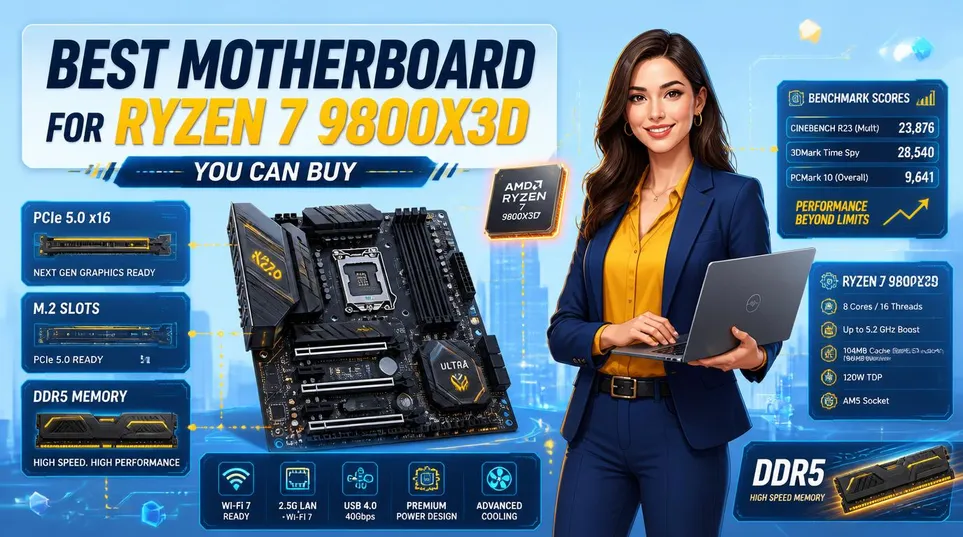
The Ryzen 7 9800X3D is one of the best gaming processors AMD has ever produced. But to get the most out of it, you need a motherboard that can genuinely keep up. Finding the best motherboard for the Ryzen 7 9800X3D affects how fast your memory runs, how stable your system stays during long gaming sessions, and how much room you have to upgrade down the line.
Not every board suits every build. Some people want a dependable option at a reasonable price. Others are putting together a high-end setup and want everything to match. This guide covers five strong options across different budgets to help you find the right fit.
Let’s get started.
Why the 9800X3D Demands the Right Board
The Ryzen 7 9800X3D launched in November 2024 and quickly became one of the most talked-about chips in the enthusiast community. Powered by AMD’s 3D V-Cache technology, it delivered a clear jump in gaming performance over its predecessor. It is also the first 3D chip that actually supports overclocking.
That last bit is the kicker. Previous 3D V-Cache chips were locked. This one is not.
What the 3D V-Cache Actually Does to Your Build
The 3D V-Cache stacks additional L3 cache directly on top of the CPU die, massively reducing memory latency for gaming workloads. Games that rely heavily on cache: Counter-Strike 2, open-world titles, and simulation games, see some of the biggest gains. So what does that mean for you? Your bottleneck shifts away from CPU-side latency and puts more pressure on your GPU, memory subsystem, and PCIe bandwidth.
This means your motherboard is not just a passive platform anymore. Boards with poor VRM regulation will throttle the chip under sustained gaming sessions. Boards with weak memory training struggle to hit the DDR5-6000 to DDR5-8000 range where the 9800X3D genuinely shines. And if you are pairing this chip with a PCIe 5.0 GPU like the RTX 5090, you need a board that delivers that full bandwidth without compromise.
Chipsets Ranked: X870E, X870, B850 and Below
Nine AM5 chipsets are compatible with the 9800X3D. These include the X870E, X870, and B850 tiers. You just need the correct BIOS update. Each provides different PCIe 5.0 lane allocations and I/O capabilities.
The X870E is the top tier. It guarantees PCIe 5.0 for both the GPU slot and at least one M.2 drive. It also mandates USB4 support. The standard X870 gives you USB4 but has fewer total lanes.
The B850 is the sweet spot for most players. It skips mandatory USB4 but brings strong power delivery and PCIe 5.0 GPU support at a lower price. B650 boards work fine for lean setups. Just scale back your memory overclocking expectations.
I will be honest: for most gamers pairing the 9800X3D with a mid-to-high-end GPU, B850 or X870 is all you genuinely need. Anyone telling you that you must spend $700 on an X870E board is probably more excited about bragging rights than benchmark deltas.
Actually, scratch that. There is one scenario where X870E earns its keep: if you are running an RTX 5090 and want future-proof PCIe 5.0 lanes with room for dual NVMe drives at full speed. More on that below.
Best Motherboard for Ryzen 7 9800X3D: Top Picks at a Glance
Before diving deep into each board, here is a side-by-side so you can see where things land.
Quick Comparison: All Five Boards Side by Side
| Motherboard | Chipset | VRM Phases | DDR5 Max Speed | PCIe 5.0 GPU | Price (Approx.) | Best For |
|---|---|---|---|---|---|---|
| MSI MAG X870 Tomahawk WiFi | X870 | 16+2+1 | DDR5-8000+ | Yes | ~$290 | Best overall |
| ASUS ROG Crosshair X870E Hero | X870E | 18+2+2 | DDR5-8600 | Yes | ~$700 | High-end GPU builds (5090, 4090) |
| ASRock X870E Taichi | X870E | 27-phase | DDR5-8400 | Yes | ~$500 | Overclockers, NAS-style storage |
| MSI MAG B850 Tomahawk Max WiFi | B850 | 14+2+1 | DDR5-8400 | Yes | ~$220 | Budget builds |
| Gigabyte X870E Aorus Elite WiFi 7 | X870E | 16+2+1 | DDR5-8200+ | Yes | ~$340 | Mid-range premium |
If you want to pair your 9800X3D with the best GPU options available, this resource on GPUs for the Ryzen 7 9800X3D covers the full picture on which cards actually unlock what this chip can do.
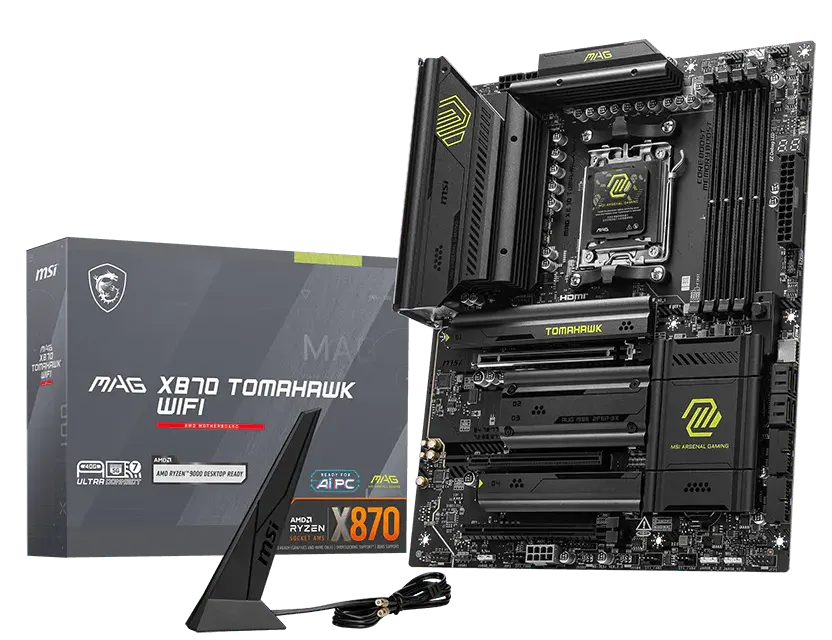
1. MSI MAG X870 Tomahawk WiFi: Best Overall Pick
MSI MAG X870 Tomahawk WiFi: Specifications
| Specification | Detail |
|---|---|
| Chipset | AMD X870 |
| Socket | AM5 |
| Form Factor | ATX |
| VRM | 16+2+1 phases |
| Memory Support | DDR5, up to DDR5-8000+ (EXPO) |
| Memory Slots | 4x DIMM, max 192GB |
| PCIe Slots | 1x PCIe 5.0 x16, 1x PCIe 4.0 x16 |
| M.2 Slots | 4x (1x PCIe 5.0, 3x PCIe 4.0) |
| SATA Ports | 4x SATA III |
| USB (Rear) | Up to 21 ports total, USB 3.2 Gen 2 |
| Networking | Wi-Fi 7, Bluetooth 5.4, 5GbE LAN |
| Approx. Price | ~$290 |
The MSI MAG X870 Tomahawk WiFi is the Zen 5-supported X870 board that PC Gamer recommends right now, with up to 21 USB ports, superb build quality, and excellent thermal and power handling.
For most people building around the 9800X3D, this is the answer. Full stop.
Specs That Punch Hard for the Price
The Tomahawk X870 ships with a 16+2+1 power stage configuration, PCIe 5.0 on both the primary GPU slot and main M.2, WiFi 7, and Bluetooth 5.4. It handles DDR5-8000+ on EXPO profiles without drama. The MSI MAG Tomahawk lineup is well-known for its value-for-money, and the X870 variant is described as perfect for most mid-premium builds, delivering PCIe 5.0 support across both GPU and M.2 storage.
Here is the thing. You can spend twice as much on an X870E board, but for standard 1440p or 4K gaming, even with a beefy GPU like an RTX 5080 or RX 9070 XT, the Tomahawk X870 does not leave frames on the table. The VRM heatsink stays cool, DDR5 training is stable, and MSI’s BIOS has been consistently updated for 9800X3D support.
Real talk. The board does not carry USB4, which is the trade-off for buying X870 over X870E. If you transfer large files between Thunderbolt-4 devices regularly, that matters. If you are a gamer who plugs in a keyboard, headset, and maybe an external SSD, you will never miss it.
Where It Falls Short (Yes, There Is One Thing)
Four M.2 slots sounds like plenty until you start filling them up. The Tomahawk X870 only has one PCIe 5.0 M.2 slot. The rest are PCIe 4.0. If you are building a workstation with multiple Gen 5 NVMe drives, this board is not your answer. For pure gaming, it is absolutely fine.
Note: If you plan on running three or more NVMe SSDs, MSI offers an X870E version of this board that prevents PCIe lane-sharing, usually for just a small price bump.
Pros and Cons
| Pros | Cons |
|---|---|
| Outstanding value for an X870 board | No USB4 support |
| Up to 21 USB ports on rear I/O | Only one PCIe 5.0 M.2 slot |
| Stable DDR5-8000+ memory training | Not ideal for heavy NVMe storage builds |
| Consistently updated BIOS for 9800X3D | Slightly large footprint (ATX only) |
| PCIe 5.0 on both GPU and primary M.2 |
2. ASUS ROG Crosshair X870E Hero: The Ultimate Board for RTX 5090 Builds
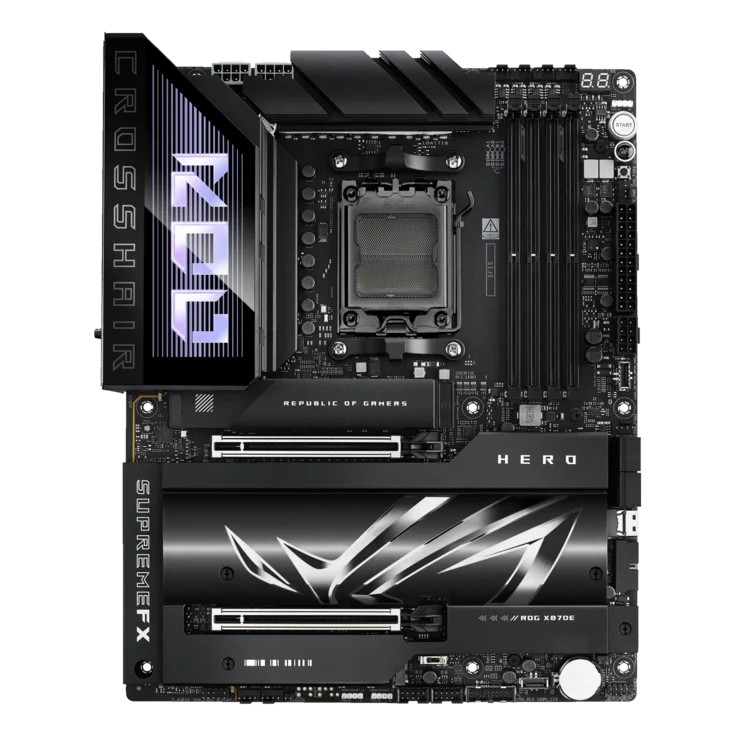
ASUS ROG Crosshair X870E Hero: Specifications
| Specification | Detail |
|---|---|
| Chipset | AMD X870E |
| Socket | AM5 |
| Form Factor | ATX |
| VRM | 18+2+2 phases |
| Memory Support | DDR5, up to DDR5-8600 (EXPO/XMP) |
| Memory Slots | 4x DIMM, max 192GB |
| PCIe Slots | 1x PCIe 5.0 x16, 1x PCIe 5.0 x4 |
| M.2 Slots | 5x (multiple PCIe 5.0) |
| SATA Ports | 4x SATA III |
| USB (Rear) | USB4 (40Gbps), USB 3.2 Gen 2×2 |
| Networking | Wi-Fi 7, Bluetooth 5.4, 5GbE + 2.5GbE LAN |
| Approx. Price | ~$700 |
If you are pairing your 9800X3D with an absolute top-of-the-range graphics card, look here. The ROG Crosshair X870E Hero stands out as an elite choice for serious gaming. It features an 18+2+2 power stage design and handles extreme memory speeds with DDR5-8600 support across 5x M.2 slots.
You might be wondering whether a $700 motherboard is worth it when a $290 board does the same gaming job. Mostly, no. But there are cases where it earns its keep.
Handling the Power of the RTX 5080 and 4090
Next-generation flagships draw massive wattage under sustained loads. Your power delivery path needs to handle that without dropping voltage. Building a system around the RTX 5080 or older RTX 4090 requires rock-solid VRM thermals.
When pushing top-tier cards this hard, heat builds up fast inside your case. You should monitor your NVIDIA GPU temperature using dedicated software to ensure thermal throttling is not ruining your frame rates.
Plot twist: the memory controller on the 9800X3D benefits directly from clean power delivery. ASUS’s DIGI+ VRM on the Hero is one of the most mature implementations on AM5, which means DDR5-8600 training is more reliable here than on boards with thinner power stages. So you get both GPU stability and memory headroom.
Pairing It with the RTX 5070 Ti, RX 9070 XT, and RTX 5090
However, if your target is the RTX 5070 Ti or the RX 9070 XT, this motherboard is overkill. Those mid-range options sit perfectly on the more affordable B850 Tomahawk variant listed below.
For an RTX 5090 build, X870E earns every dollar. Tom’s Hardware places the ROG Crosshair X870E Hero at $699.99 as the lead option below the flagship MSI MEG X870E Godlike tier. For an RTX 5090 pairing specifically, the reinforced PCIe 5.0 x16 slot and USB4 connectivity future-proof the build through the next CPU generation.
For an RTX 4090 build in 2027, X870E makes sense if you plan to hold onto the board through Zen 6 CPUs down the line. The AM5 socket is confirmed through at least one more generation.
Pros and Cons
| Pros | Cons |
|---|---|
| Top-tier VRM for sustained high-frequency operation | Expensive for most gaming builds |
| USB4 with 40Gbps throughput | Overkill for mid-range GPU pairings |
| 5x M.2 slots for heavy storage builds | Premium price requires a matching build budget |
| Dual LAN for low-latency and high-speed networking | Larger and heavier than typical ATX boards |
| Excellent DDR5-8600 memory training reliability |
3. ASRock X870E Taichi: Best for Overclocking and Heavy Storage
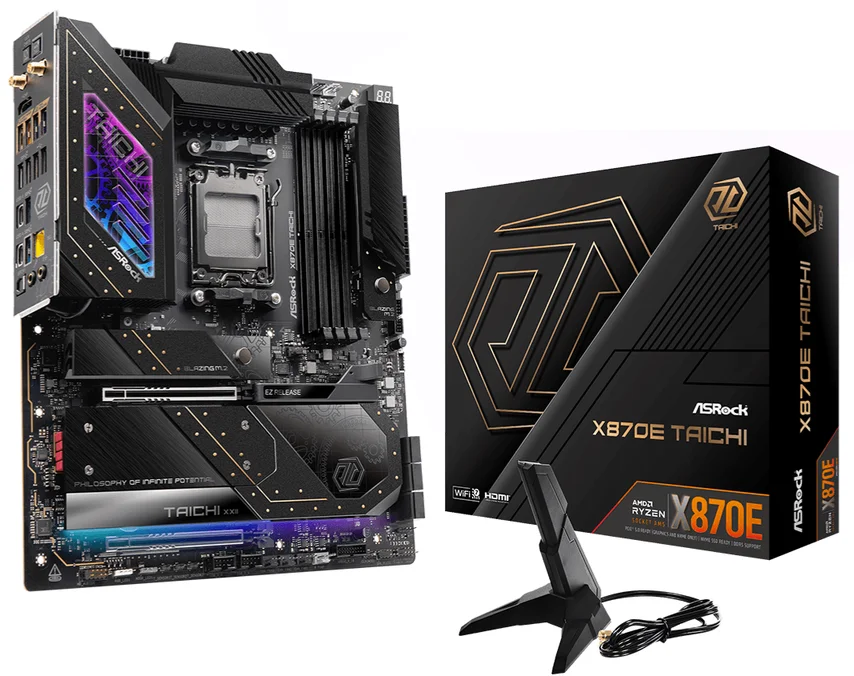
ASRock X870E Taichi: Specifications
| Specification | Detail |
|---|---|
| Chipset | AMD X870E |
| Socket | AM5 |
| Form Factor | ATX |
| VRM | 27-phase (high-density design) |
| Memory Support | DDR5, up to DDR5-8400+ (EXPO/XMP) |
| Memory Slots | 4x DIMM, max 192GB |
| PCIe Slots | 1x PCIe 5.0 x16 |
| M.2 Slots | 4x (PCIe 5.0 and PCIe 4.0) |
| SATA Ports | 6x SATA III |
| USB (Rear) | USB4 (40Gbps), USB 3.2 Gen 2 |
| Networking | Wi-Fi 7, Bluetooth 5.4, 5GbE LAN |
| Approx. Price | ~$500 |
GeekaWhat names the ASRock X870E Taichi the best motherboard for the Ryzen 7 9800X3D overall, citing its 27-phase VRM, massive heatsinks, USB4, PCIe 5.0, Wi-Fi 7, 5GbE LAN, and tool-less M.2 installation as key advantages.
I reckon this is the board that most serious builders keep sleeping on. The Taichi sits at around $500, which puts it squarely between the Tomahawk X870 and the ROG Hero, and for what you get, it is a canny buy.
27-Phase VRM and What That Means for You
Most boards in this price range run 16 to 18 power stages. The Taichi’s 27-phase design is not marketing fluff. More phases mean each individual stage handles a smaller share of the load, which means lower temperatures and more stable voltage delivery under the 9800X3D’s demanding boost behavior.
So what does that mean for you? Sustained gaming sessions, including 6-hour Warzone marathons and all-day stream setups, stay stable where lesser boards start thermal throttling. AORUS’s own testing found that X3D Turbo Mode can deliver up to a 5% gaming performance boost for the 9800X3D, and the large VRM fin-array heatsink on premium AM5 boards offers up to 10 times the surface area of standard heatsink designs.
The Budget-to-Premium Trade-Off You Need to Know
The Taichi does not have the most flashy aesthetics. It leans industrial: gear motifs, silver heatsinks, no RGB explosions. If you are building in a tempered glass case specifically for the lights show, you might prefer the ROG Hero. If you care more about whether the board is still running clean 3 years from now, the Taichi is your mate.
One genuine downside: the BIOS UI is less polished than ASUS’s interface. Not bad, just not quite as intuitive for first-time builders tweaking DDR5 subtimings.
Pros and Cons
| Pros | Cons |
|---|---|
| Industry-leading 27-phase VRM for the price | Industrial aesthetic, no RGB |
| 6x SATA ports for legacy storage needs | BIOS less intuitive than ASUS or MSI |
| Tool-less M.2 installation | Slightly harder to find in some regions |
| USB4 and 5GbE LAN at a mid-range price | No second LAN port unlike the ROG Hero |
| Strong thermal headroom for long gaming sessions |
4. MSI MAG B850 Tomahawk Max WiFi: Best Budget Pick
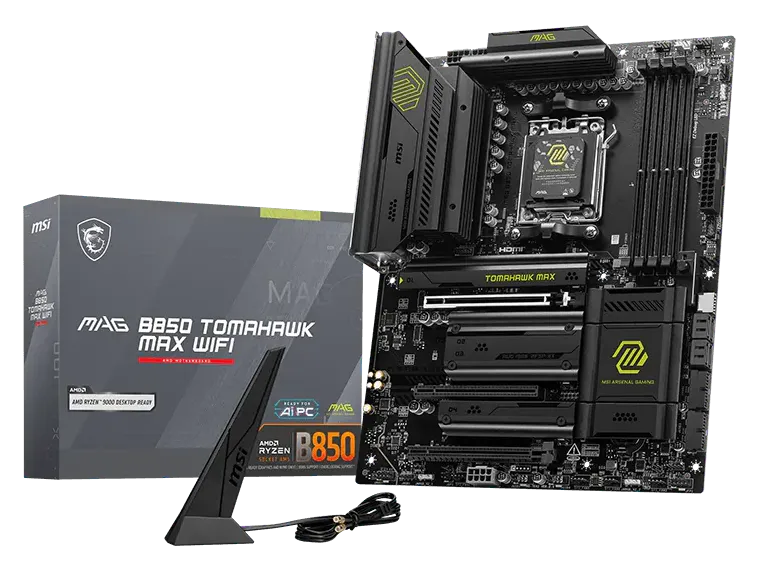
MSI MAG B850 Tomahawk Max WiFi: Specifications
| Specification | Detail |
|---|---|
| Chipset | AMD B850 |
| Socket | AM5 |
| Form Factor | ATX |
| VRM | 14+2+1 phases |
| Memory Support | DDR5, up to DDR5-8400 (EXPO/XMP) |
| Memory Slots | 4x DIMM, max 192GB |
| PCIe Slots | 1x PCIe 5.0 x16 |
| M.2 Slots | 4x (1x PCIe 5.0, 3x PCIe 4.0) |
| SATA Ports | 4x SATA III |
| USB (Rear) | USB 3.2 Gen 2, USB 3.2 Gen 2×2 |
| Networking | Wi-Fi 7, Bluetooth 5.4, 5GbE LAN |
| Approx. Price | ~$220 |
The MSI MAG B850 Tomahawk Max WiFi carries a 14+2+1 VRM design, DDR5-8400 support, 4x M.2 slots, and 4x SATA ports. VRM temperatures in testing maxed at 59°C, and it keeps costs below $300, making it the best budget board for the 9800X3D.
Howay, let me be straight with you: this board does not belong in the “budget” category the way that phrase is usually used. B850 is not a stripped-down platform. PCIe 5.0 GPU support is included. DDR5-8400 is achievable. And the Tomahawk build quality is well above what you would expect south of $250.
Who This Board Is Actually For
If you are pairing the 9800X3D with an RTX 5070 Ti, RTX 4090, or RX 9070 XT and your total build budget is around $1,500 to $2,000, the B850 Tomahawk is where you save money without losing gaming performance. You give up USB4 and a couple of M.2 slots compared to X870E, but I might be wrong on this, but most gamers fill maybe two M.2 slots tops.
The EZ-DIY features, including EZ M.2 clips and a CPU bracket, make this excellent for first-time builders who do not want to break things learning the platform. Not gonna lie, I have seen experienced builders snap M.2 connectors fumbling around in tight spots. Clip mechanisms are a small thing that saves a lot of grief.
Pros and Cons
| Pros | Cons |
|---|---|
| Best price-to-performance ratio on this list | No USB4 |
| DDR5-8400 support at a budget-friendly price | Fewer PCIe lanes than X870E boards |
| EZ-DIY features ideal for first-time builders | VRM slightly less capable than X870 boards |
| VRM temps stayed under 59°C in testing | B850 chipset limits high-end overclocking ceiling |
| PCIe 5.0 GPU slot included |
5. Gigabyte X870E Aorus Elite WiFi 7: Best Mid-Range Premium
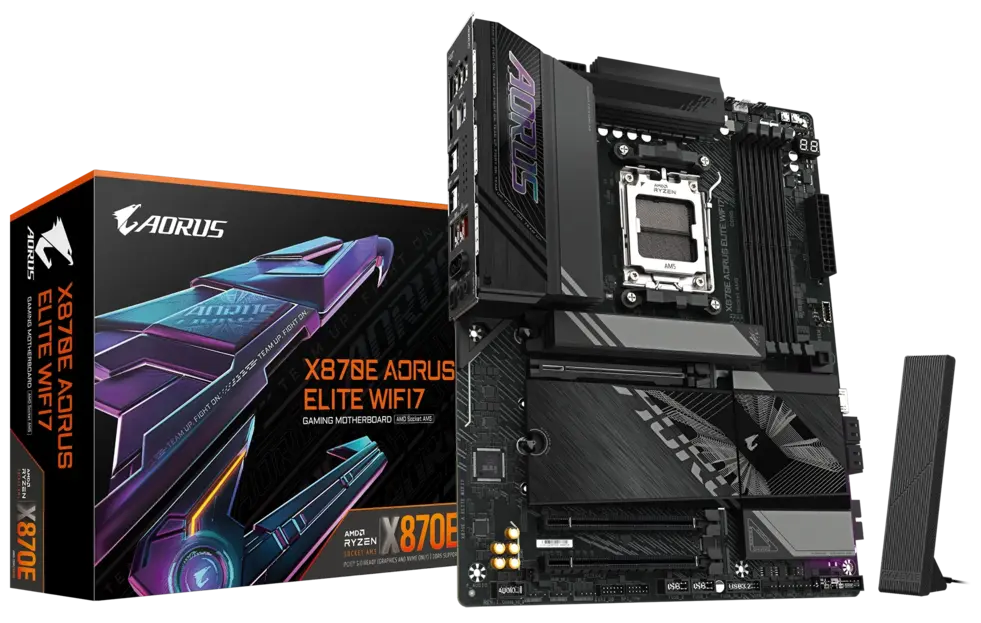
Gigabyte X870E Aorus Elite WiFi 7: Specifications
| Specification | Detail |
|---|---|
| Chipset | AMD X870E |
| Socket | AM5 |
| Form Factor | ATX |
| VRM | 16+2+1 phases |
| Memory Support | DDR5, up to DDR5-8200+ (EXPO/XMP) |
| Memory Slots | 4x DIMM, max 192GB |
| PCIe Slots | 1x PCIe 5.0 x16 |
| M.2 Slots | 4x (PCIe 5.0 and PCIe 4.0) |
| SATA Ports | 4x SATA III |
| USB (Rear) | 2x USB4 (40Gbps), USB 3.2 Gen 2 |
| Networking | Wi-Fi 7, Bluetooth 5.4, 2.5GbE LAN |
| Approx. Price | ~$340 |
The Gigabyte X870E Aorus Elite Wi-Fi7 has attracted attention after recent price drops, offering the top-of-the-line X870E chipset with 4x M.2 slots, dual USB4, and WiFi 7, and is described as standing out particularly for overclocking potential and heavy storage configurations.
At around $340, this board sits in a genuinely useful gap. It is X870E, so you get USB4 and full PCIe 5.0 across both GPU and at least one M.2, but it costs notably less than the ROG Hero or ASRock Taichi.
X3D Turbo Mode and Why It Matters
Gigabyte’s AORUS AI SNATCH interface includes an X3D Turbo Mode that delivers up to a 5% gaming boost for 9800X3D processors, and users can confirm activation by checking the flag icon in the bottom-left of the interface.
That 5% gain might sound small. But at 4K with an RTX 5090, a 5% swing can be the difference between consistently hitting 120fps and occasionally dipping below it. For games already CPU-bound, think strategy titles, simulation games, and heavily modded Bethesda games, the real-world impact is larger.
And that is the thing: the Aorus Elite gives you the X870E platform’s premium I/O at a price point that does not require justifying to a suspicious partner. It is proper value for anyone who wants more than the Tomahawk but cannot stomach the ROG Hero’s price tag.
Pros and Cons
| Pros | Cons |
|---|---|
| Full X870E chipset at a mid-range price | 2.5GbE LAN only, no 5GbE |
| Dual USB4 ports on rear I/O | Memory ceiling slightly lower than ROG Hero |
| X3D Turbo Mode for up to 5% gaming boost | Fewer SATA ports than the ASRock Taichi |
| 4x M.2 slots for storage flexibility | VRM not as robust as Taichi at a similar price |
| Solid overclocking support for the 9800X3D |
Future Outlook: AM5 and the 9800X3D in 2027 and Beyond
The AM5 platform is not going anywhere soon. AMD has confirmed AM5 socket compatibility extends to at least one more CPU generation after Ryzen 9000. That means the board you buy today for the 9800X3D could plausibly still be running a Zen 6 chip two years from now.
The global motherboard market was projected to reach approximately $14.8 billion by 2026, according to Grand View Research data, driven in large part by DDR5 platform adoption and gaming PC builds. For you, practically, that means supply is healthy, prices on X870 and B850 boards are trending downward through 2027, and mid-range options are getting stronger with each refresh cycle.
Here is the takeaway: do not over-spec the board just because the market is evolving fast. Buy for what you need today, with one generation of headroom baked in.
Why We Did Not Include 600-Series Motherboards
The 600-series boards, covering the X670E, X670, B650E, and B650 chipsets, are technically compatible with the 9800X3D after a BIOS update. So why are they not on this list?
The short answer is value. When these boards launched, they carried premium prices. Many high-end X670E boards still cost as much as newer X870E options today, yet they lack Wi-Fi 7 and offer slower USB standards by default.
The 800-series boards covered in this guide deliver better connectivity, stronger memory overclocking support, and more up-to-date platform features at competitive prices. For a new build in 2027, there is no clear reason to choose a 600-series board over an 800-series equivalent unless you already own one. If you do, the 9800X3D will still run well on it. But for anyone buying fresh, the 800-series is the better starting point.
Frequently Asked Questions
Q: What is the best motherboard for the Ryzen 7 9800X3D for most gamers?
A: The MSI MAG X870 Tomahawk WiFi is the top pick for most users. It delivers PCIe 5.0, DDR5-8000+ support, WiFi 7, and strong VRM cooling at around $290, without requiring you to pay for X870E features you likely won’t use.
Q: Does the Ryzen 7 9800X3D need an X870E motherboard?
A: No. The 9800X3D works on any AM5 chipset with a BIOS update, including B850 and B650. X870E adds USB4, more PCIe 5.0 lanes, and improved memory overclocking headroom, useful for RTX 5090 builds or heavy storage setups, but not required for solid gaming.
Q: What is the best budget motherboard for the Ryzen 7 9800X3D?
A: The MSI MAG B850 Tomahawk Max WiFi at around $220. It supports DDR5-8400, has PCIe 5.0 for the GPU, four M.2 slots, and keeps VRM temps under 60°C in extended sessions. Impressive for the price.
Q: Is the 9800X3D compatible with older X670E boards?
A: Yes, after a BIOS update. High-end X670E boards like the ASUS ROG Crosshair X670E Hero still perform well with the 9800X3D, and are often available at a discount compared to newer X870E options.
Final Thoughts
Finding the best motherboard for the Ryzen 7 9800X3D comes down to matching the board to your actual build, not just picking the most expensive option on the shelf.
For most gamers, the MSI MAG X870 Tomahawk WiFi covers everything you need at a price that makes sense. If you are building around a flagship GPU like the RTX 5090, the ASUS ROG Crosshair X870E Hero is worth the investment.
The ASRock X870E Taichi suits builders who want serious overclocking headroom. On a tighter budget, the MSI MAG B850 Tomahawk Max WiFi delivers strong performance without unnecessary cost. And the Gigabyte X870E Aorus Elite WiFi 7 sits comfortably in the middle for anyone who wants X870E features without the flagship price.
Whichever board you choose, the Ryzen 7 9800X3D will reward you with one of the best gaming experiences available today.

Aveloria Thessar, based in California, USA, is Head Content Editor at BestGuides.in and a lead hardware reviewer with 8+ years of hands-on experience in building and benchmarking PCs. She began assembling her first PC in high school, sparking a lifelong passion for graphics cards, high-performance CPUs, gaming laptops, and SSDs. Over the years, Aveloria has tested dozens of components, running repeatable benchmarks to deliver accurate, practical insights. She shares her expertise through detailed guides and reviews, helping enthusiasts make confident, informed decisions, while actively contributing to tech communities and professional networks to stay at the forefront of PC hardware trends.