Today, in this article, we have included the latest GPUs you can upgrade from a GTX 1060 graphics card.
After comparing the gaming performance and price of each graphics card, we got some decent options.
Therefore, to make the right decision with the best gaming performance at the best price, you can check the option mentioned below.
So let’s check them.
1. Asus GeForce RTX 5050 8 GB Graphics Card (Good 1080p Gaming on a Budget)
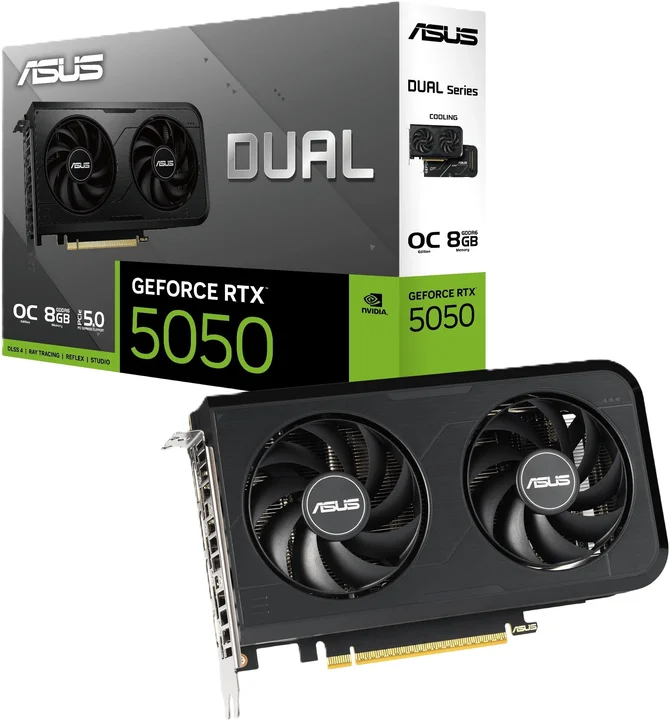
The RTX 5050 is Nvidia’s entry-level Blackwell GPU launched in July 2025. Starting at $249, it brings DLSS 4 with Multi Frame Generation to budget-tier gaming.
It comes with 2,560 CUDA cores and 8 GB of GDDR6 memory with a 130W power draw, so it works fine with most existing power supplies. The 8 GB VRAM is enough for 1080p but will feel tight at 1440p on newer titles.
Gaming Performance of RTX 5050
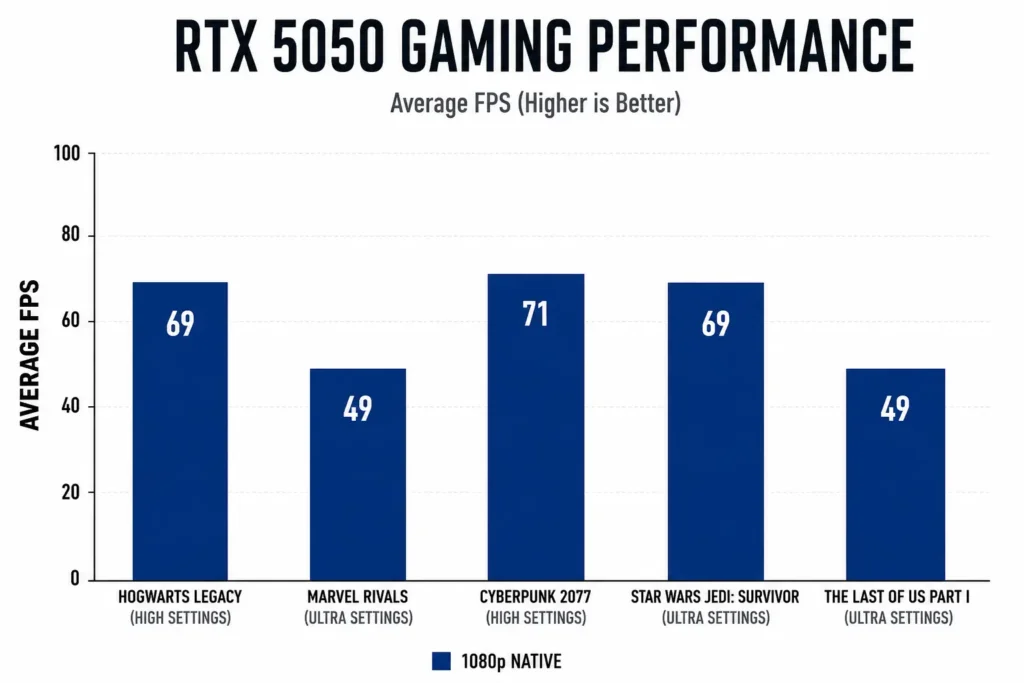
Most titles run well at high settings. Marvel Rivals and The Last of Us drop to 49 FPS on ultra, so lowering settings on those two is recommended.
Comparison with GTX 1060
The RTX 5050 is a big step up from the GTX 1060. You can expect more than double the frame rates, plus you gain access to ray tracing and DLSS 4, which the GTX 1060 does not support at all.
2. Msi GeForce RTX 5060 8 GB Graphics Card (Best Upgrade for GTX 1060)
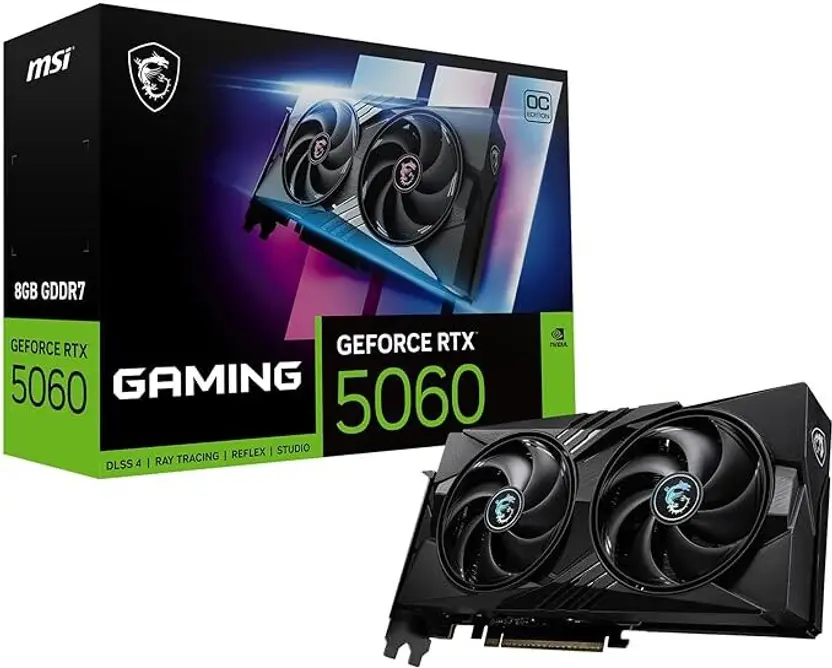
The RTX 5060 is Nvidia’s latest budget-tier Blackwell GPU, built for 1080p gaming in 2026. Starting at $299, it matches the original launch price of the RTX 4060, keeping it accessible for most gamers looking to upgrade.
The card packs 8 GB of GDDR7 VRAM and 3,840 CUDA cores. That 8 GB is comfortable for 1080p gaming, but honestly, you may start hitting limits at 1440p with heavier modern titles, especially with newer games.
Gaming Performance of RTX 5060
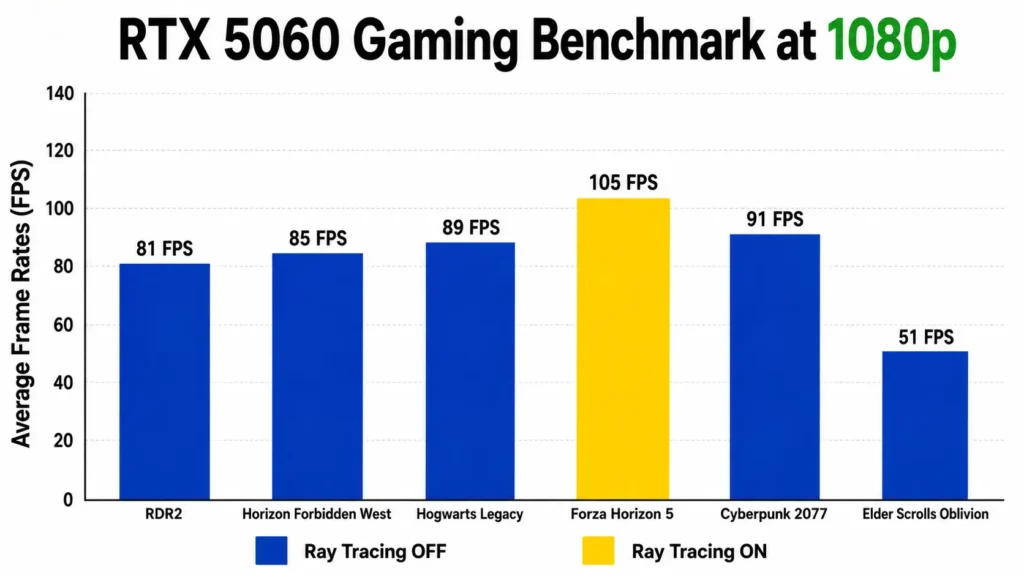
Oblivion Remastered is the most graphics-demanding game in our testing, which requires a GTX 1070 ti as a minimum to run it according to Steam. So your GTX 1060 is not enough for it to play, even RTX 5060 is giving an average of 51 FPS with that game.
However, that game is notoriously unoptimised right now, so expect that number to climb with driver updates. Every other title sits comfortably above 80 FPS, which is a great baseline.
And that’s before you even switch on DLSS 4. With DLSS 4 Multi Frame Generation, the RTX 5060 can deliver double the performance of the RTX 4060 in supported titles, so those frame rates above can go significantly higher.
Comparison with GTX 1060
No contest. The RTX 5060 leads the older RTX 3060 by around 45% in rasterized workloads, and the GTX 1060 is two full generations behind that. You’re realistically looking at three to four times the performance in most games compared to the GTX 1060, plus you gain access to ray tracing and DLSS 4, which the 1060 simply does not support.
But still, if you’re planning to move to 1440p soon, the RTX 5060 Ti 16 GB variant is worth the extra spend.
3. MSI Radeon RX 9070 16 GB Graphics Card (For 1440p Gaming)
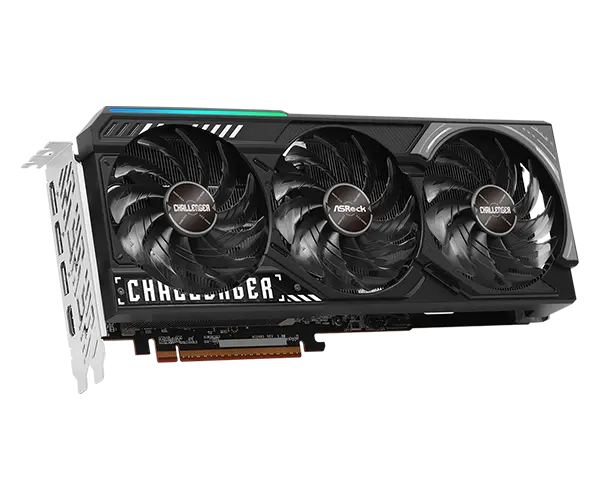
The RX 9070 is built on AMD’s new RDNA 4 architecture, packs 16 GB of VRAM, and launched at $549. It has 16 GB, which is really good for 1440p gaming, even on demanding modern titles.
You can use FSR 4 to get extra frame rates at 1440p or push into 4K gaming on less demanding titles. Also, it is one of the most power-efficient GPUs on the market right now.
Gaming Performance of RX 9070
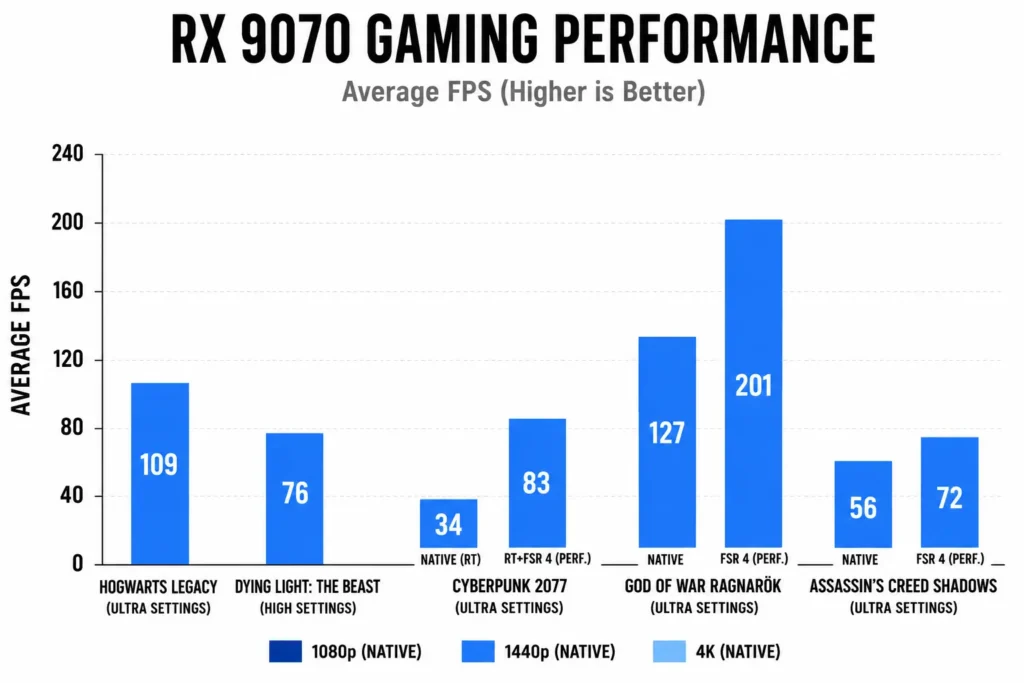
Cyberpunk at 34 FPS with ray tracing and no FSR shows the card struggles with heavy ray tracing alone. Switching to FSR 4 (performance) and it jumps straight to 83 FPS, which is a big difference.
Comparison with GTX 1060
No comparison at all. The RX 9070 delivers more than triple the frame rates of a GTX 1060 at 1440p, a resolution the GTX 1060 was never really designed for. You also gain FSR 4 upscaling support, which the GTX 1060 does not have.
Gaming Performance of GTX 1060
GeForce GTX 1060 is a good option for normal gaming, but it won’t be capable of high-end gaming because of old architecture, no ray tracing, and no DLSS.
But still, let’s check its current gaming performance and find the best option you can consider to upgrade from GTX 1060.
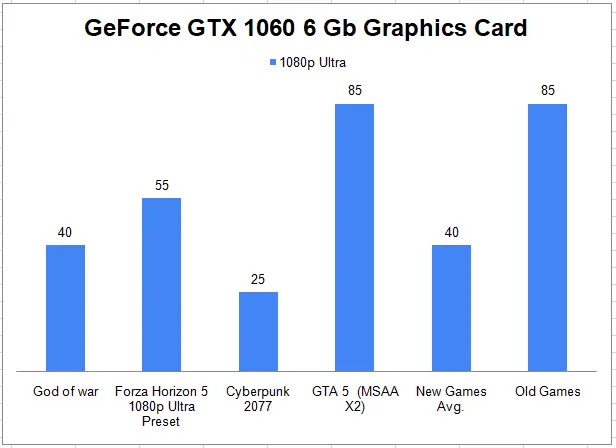
Currently, GTX 1060 offers an average of 40 frame rates on 1080p resolution with ultra settings. However, in-game like Cyberpunk 2077 the frame rate drops down to 25 only which is not payable.
Therefore, consider upgrading from GTX 1060 for a better gaming experience.
Factors to Consider Before Upgrading from GTX 1060
Before upgrading, consider a few important things to make the right decision.
Upgrading your monitor.
For full utilization of your new graphics card, you need a compatible monitor. If your monitor is only capable of 60Hz at 1080p, pairing it with an RTX 5060 or RX 9070 does not make sense. You will not see the full benefit.
For 1440p gaming, you need a 1440p monitor. For high refresh rate gaming, you need a high refresh rate monitor. Always match your monitor to your graphics card, not the other way around.
For a basic 1080p 60Hz monitor, the RTX 5050 at $249 is enough. No need to spend more.
Upgrading your PC.
If your motherboard and CPU are also old, upgrading only the GPU will create a bottleneck. A GTX 1060-era CPU paired with an RX 9070 will hold back performance. Consider a CPU upgrade alongside your GPU if your system is more than 6 to 7 years old.
Should you wait or upgrade now?
If you are gaming at 1080p right now and just want a straightforward upgrade, the RTX 5050 or RTX 5060 are both available and well-priced in 2026.
For 1440p gaming with good ray tracing support, the RX 9070 is the best option in this list.
There is no strong reason to wait right now. The current GPU lineup from both Nvidia and AMD offers solid value across all budgets.
Frequently Asked Questions
Is it worth upgrading GTX 1060 to RTX 3060?
RTX 3060 is a decent upgrade, but no longer the best use of money in 2026. The RTX 5050 at $249 delivers better performance with DLSS 4. If budget allows, the RTX 5060 at $299 is the smarter pick for 1080p gaming.
Should I upgrade from 1060 to RTX 2060?
No. The RTX 2060 is outdated in 2026. The RTX 5050 is available at a similar price with better performance and DLSS 4 support. Go with a current-generation card instead.
Is 1060 6GB still good in 2026?
Yes, it can still handle 1080p gaming on older titles. But 6 GB VRAM is limiting in newer games. You also miss out on DLSS and ray tracing, so an upgrade makes sense if you play modern titles.
What is the next step up from GTX 1060 6GB?
The RTX 5050 at $249 is the most straightforward upgrade for any motherboard. For better 1080p performance, the RTX 5060 at $299 is the stronger option. For 1440p gaming, consider the RX 9070.
Conclusion
GTX 1060 is a capable graphics card, but it is showing its age in 2026. For the best upgrade, the RTX 5060 at $299 is the strongest 1080p option on this list.
For a budget pick, the RTX 5050 is a very nice pick. For serious 1440p gaming, the RX 9070 is the clear choice.
So that is the guide on the best graphics cards to upgrade from the GTX 1060.
Now I want to hear from you, which graphics card did you like the most? Let me know in the comments below.
Also Check: Best upgrade options for GTX 1070 Graphics card

Aveloria Thessar, based in California, USA, is Head Content Editor at BestGuides.in and a lead hardware reviewer with 8+ years of hands-on experience in building and benchmarking PCs. She began assembling her first PC in high school, sparking a lifelong passion for graphics cards, high-performance CPUs, gaming laptops, and SSDs. Over the years, Aveloria has tested dozens of components, running repeatable benchmarks to deliver accurate, practical insights. She shares her expertise through detailed guides and reviews, helping enthusiasts make confident, informed decisions, while actively contributing to tech communities and professional networks to stay at the forefront of PC hardware trends.