
The Intel Core i5 7400 is an old processor but is still, capable of 1080p gaming with a decent graphics card.
So today you will know some of the best graphics card options for the i5 7400 processor.
Let’s check these options.
| Name | Performance | GPU Compatibility |
|---|---|---|
| 1. RTX 3050 | 1080p Good Gaming | Some bottlenecks on 1080p resolution |
| 2. Rx 6600 | 1080p Ultra gaming | Some bottlenecks on 1080p resolution |
| 3. GTX 1650 | 1080p budget gaming | Fully Compatible |
| 4. Rx 6500 XT | 1080p budget gaming | Compatible |
| 5. RTX 3060 ti | 1440p Ultra gaming | Bottlenecks on 1080p gaming |
#1 Asus Dual GeForce RTX 3050 8 GB Graphics Card

Specification of RTX 3050
- CUDA CORES: 2650
- Bus clock: 1780
- Boost clock: 1550
- RAM: 8Gb
- Maximum digital resolution: 7680×4320
- Maximum GPU temperature: 93
- Recommended System power: 550W
- Graphics card power: 130W
This Nvidia RTX 3050 6 Gb is one of the cheapest new RTX graphics cards currenly available. You can expect 1080p gaming on high settings in older and popular games. In the newest heavy games, this GPU offers you low to medium settings gameplay with DLSS.
However, ray tracing is not worth using on this graphics card.
| PROS | CONS |
|---|---|
| No power connector needed | Only 6 Gb VRAM |
| Low power use (70W) | Slower than the 8 Gb RTX 3050 |
| Good 1080p gaming | Struggles in new heavy games |
| DLSS support | Used cards give better value |
| Low-profile models available |
Why consider RTX 3050

If your i5 7400 is in a prebuilt PC with a weak power supply and no GPU cable, then this is the safest upgrade. You can plug it in and start gaming. Moreover, RTX 3050 is an entry-level card, so the i5 7400 will bottleneck it less than a faster card.
However, this card uses PCIe 4.0 x8 and the i5 7400 supports only PCIe 3.0, so you can lose a little performance. If your power supply has a 6-pin or 8-pin cable, consider the RX 7600 below. You can also check a used GTX 1660 Super, which performs about the same for nearly half the price as compared to RTX 3050.
View More: Best CPU upgrade for I5 9400f processor.
#2 Sapphire Radeon Rx 6600 8 Gb Graphics Card

This is a graphics card from AMD with the RDNA 3 architecture. It is a good pair for the i5 7400 if you want much more performance than the RTX 3050 6 Gb.
Features of Rx 7600
RX 7600 is a budget-friendly graphics card. It is about 24% faster than the RX 6600, and the RX 6600 itself is around 28% faster than the RTX 3050 6 Gb. Also, it has better ray tracing, AV1 encoding and DisplayPort 2.1.
However, it needs one 8-pin power connector. So check your current system power supply before buying.
Why consider Rx 7600

If you have a normal PC with a good power supply, you can consider this graphics card for 1080p gaming. In most games it will still give equal or better FPS than the RTX 3050 6 Gb, even it bottlenecks more with i5 7400.
However, the i5 7400 has only 4 cores and 4 threads, so the processor will be on 100% usage in new games. Expect some stutter and lower FPS than online reviews. Also, this card uses PCIe 4.0 x8 and the i5 7400 supports only PCIe 3.0, so you can lose a little more performance.
Moreover, if you want to play latest games then you have to upgrade to new PC build.
| PROS | CONS |
|---|---|
| Much faster than RTX 3050 6 Gb | Needs 8-pin power connector |
| Good 1080p gaming | Needs 550W power supply |
| Better ray tracing than RX 6600 | Bottleneck in new games |
| AV1 encoding | Best for 1080p (1440p needs lower settings) |
| 8 Gb VRAM limit in some new games |
#3 MSI GeForce GTX 1650 4 GB Graphics Card

GTX 1050 ti can be used with this processor but for best performance, GTX 1650 is better. GTX 1650 comes as an affordable option
Feature Of GTX 1650
GTX 1650 has 4 Gb Vram which is enough for 1080p gaming. Also, it doesn’t require a big power supply to run properly.
It is fully capable of budget-level gaming on 1080p resolution. However, ray tracing is not available on this card.
Why consider GTX 1650

If you want a budget-friendly Gpu for i5 7400 then you can consider this graphics card.
Moreover, if you want a better price to performance value then you can wait for RTX 3050 graphics cards.
For a budget-friendly graphics card, you can check the list given below or the list of graphics cards for the i5 4th generation.
| Pros | Cons |
|---|---|
| 1. Low Power Requirement | 1. Performs similar to Rx 570 |
| 2. Budget 1080p Gaming | 2. Memory not overclockable |
| 3. No extra power connector required | |
| 4. Quiet While Gaming | |
| 5. Much better option as compared with GTX 1050 ti |
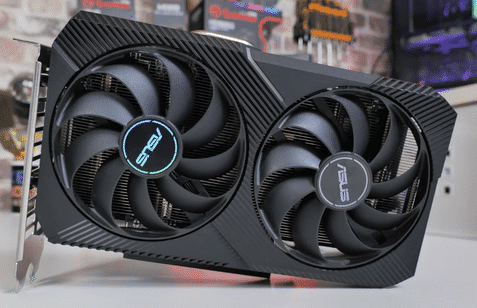
#4 Asus Dual Radeon RX 6500 XT 4 Gb Graphics Card (performs Slightly Slow with i5 7400f)
Specification of RX 6500 XT
- Stream CORES: 1024
- Compute Units: 16
- Bus clock: 2815 MHz
- Boost clock: 2610 MHz
- RAM: 4GB
- Memory speed: 18 Gbps
- Maximum digital resolution: 7680×4320
- Recommended System power: 400W
- Graphics card power: 107W
Radeon RX 6500 XT is a newly launched graphics card from AMD for budget-friendly gaming on 1080p resolution. But still, for a similar or slightly higher price, the RTX 3050 offers better gaming performance than this graphics card.
However, if you get this graphics card for under 350$ or ₹25000 then it will be a good option for you.
| PROS | Cons |
|---|---|
| 1. Good For 1080p Resolution Gaming | 1. Only 4 Gb Video Memory |
| 2. Ray Tracing Available | 2. Performs Similar to RX 580 |
| 3. Low Power Requirement | |
| 4. Fast Video Memory |
why consider RX 6500 XT
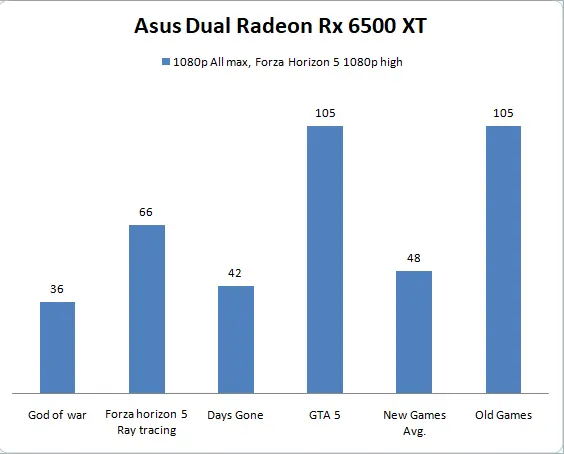
If you want to play games without ray tracing with a budget-friendly graphics card then you can consider this graphics card. However, it can give you a good ray tracing performance in some old games.
Moreover, if you want a better graphics card for gaming then check the upcoming option.
#5 MSI GeForce RTX 3060 ti 8 Gb Graphics Card

This is a decent gaming graphics card from Nvidia. You can use this GPU for gaming on 4k resolution as well.
Features of RTX 3060 ti
It has a fast GDDR6 8 GB video memory. The 8Gb Vram is more than enough for gaming on higher resolutions. Also, this card can handle newly launched games with 1440p resolution.
You will get better performance and value as compared with the RTX 2070 super graphics card. But Still, this graphics card requires 200-watt power to run. Check if your power supply is 600 watts or more before using this graphics card.
Why Consider RTX 3060 ti

While gaming on 1080p with I5 7400 you may see some bottleneck from the processor. So if you want more high-resolution gaming then you can consider this graphics card.
Moreover, this graphics card is a good option for ray tracing as well. It can handle games with ray tracing on 1080p resolution easily.
| PROS | CONS |
|---|---|
| 1. 4k medium gaming possible | 1. Currently price is high. |
| 2. Triple fan variant available | 2. 12 Pin Connector required |
| 3. Overclockable | |
| 4. Great for ray tracing | |
| 5. RGB options are also available |
Frequently Asked Questions On Gpu For i5 7400
Is i5-7400 enough for RTX 3060?
No, RTX 3060 is not required to pair with the i5 7400 processor. Because the i5 7400 will bottleneck with the RTX 3060 graphics card. In our tests, we found that i5 7400 can extract only 50 to 60% performance of RTX 3060.
Will an i5-7400 bottleneck a RTX 2060?
Yes, but not in every game. In high-end games where i5 7400 produces fewer frame rates. Basically, RTX 2060 performs almost like GTX 1660 super with i5 7400.
What is the best GPU for i5-7400?
For i5 7400 you can check GTX 1650 for gaming without ray tracing. For ray tracing you can check the maximum RTX 3050. Also, RTX 3050 will perform slightly slower in some new games with i5 7400.
Conclusion
The Intel i5 7400 is capable of 1080p resolution gaming. Also, you can play the latest launched gaming on this processor.
However, you will not get high frame rates on 1080p ultra settings with very new games. Therefore, you should consider RTX 3050 8 Gb maximum for the best gaming experience from an i5 7400 or i5 7500 processor.
So here’s the list of best graphics cards for the i5 7400.
Now I want to know from you. Do you want to buy a graphics card for gaming or want to upgrade from your i5 processor?
Let me know in the comments below.

I founded Bestguides.in. I have knowledge about PC Building for 5+ years. With a combined experience of over 8 years in the tech industry, we have been providing informative and insightful guides and articles on technology products since 2020. While not writing, I can be found reading books or playing games.